php智能判定页面标题和内容class 命中率高达99%
在AI兴起之前,一直在用的代码,分享给盆友们~
Mozilla Readability.js 的 PHP 端口。解析 html(通常是新闻和文章)返回标题、作者、主图像和文本内容(最新版可用属性)。分析每个节点,给它们打分,并确定哪些是相关的,哪些可以丢弃。
算法原作者:https://github.com/mingcheng/php-readability/
算法新版:https://github.com/andreskrey/readability.php(该项目已经废弃)
算法最新版:https://github.com/fivefilters/readability.php
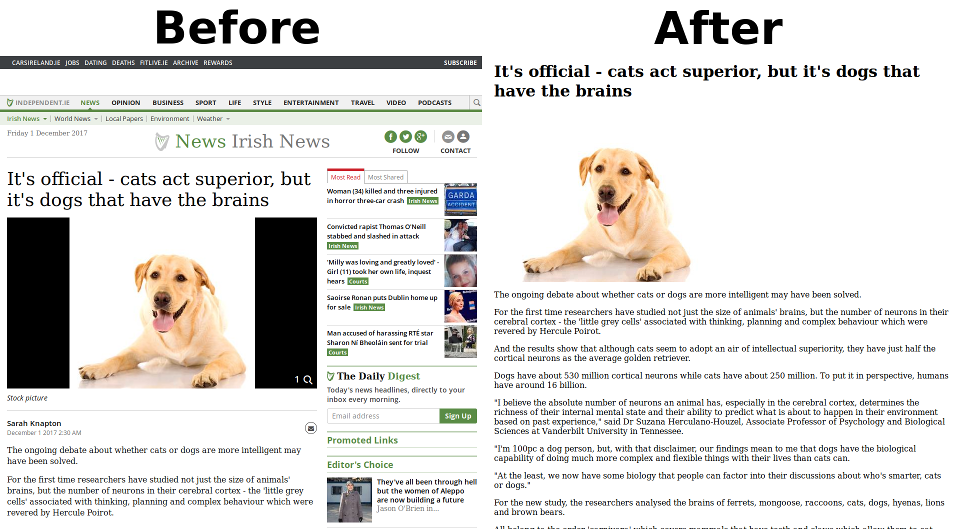
require 'Readability.php';
$html = "整个html页面";
$Readability     = new Readability($html);
$ReadabilityData = $Readability->getContent();

//var_dump($ReadabilityData);
echo "<h1>".$ReadabilityData['title']."</h1>";
echo $ReadabilityData['content'];
Readability.php
class Readability {
	// 保存判定结果的标记位名称
	const ATTR_CONTENT_SCORE = "contentScore";

	// DOM 解析类目前只支持 UTF-8 编码
	const DOM_DEFAULT_CHARSET = "utf-8";

	// 当判定失败时显示的内容
	const MESSAGE_CAN_NOT_GET = "Readability was unable to parse this page for content.";

	// DOM 解析类(PHP5 已内置)
	protected $DOM = null;

	// 需要解析的源代码
	protected $source = "";

	// 章节的父元素列表
	private $parentNodes = array();

	// 需要删除的标签
	// Note: added extra tags from https://github.com/ridcully
	private $junkTags = Array("style", "form", "iframe", "script", "button", "input", "textarea",
								"noscript", "select", "option", "object", "applet", "basefont",
								"bgsound", "blink", "canvas", "command", "menu", "nav", "datalist",
								"embed", "frame", "frameset", "keygen", "label", "marquee", "link");

	// 需要删除的属性
	private $junkAttrs = Array("style", "class", "onclick", "onmouseover", "align", "border", "margin", "id", "contentScore");


	/**
	 * 构造函数
	 *	  @param $input_char 字符串的编码。默认 utf-8,可以省略
	 */
	function __construct($source, $input_char = "utf-8") {
		$this->source = $source;

		// DOM 解析类只能处理 UTF-8 格式的字符
		$source = mb_convert_encoding($source, 'HTML-ENTITIES', $input_char);

		// 预处理 HTML 标签,剔除冗余的标签等
		$source = $this->preparSource($source);

		// 生成 DOM 解析类
		$this->DOM = new DOMDocument('1.0', $input_char);
		try {
			//libxml_use_internal_errors(true);
			// 会有些错误信息,不过不要紧 :^)
			if (!@$this->DOM->loadHTML('<?xml encoding="'.Readability::DOM_DEFAULT_CHARSET.'">'.$source)) {
				throw new Exception("Parse HTML Error!");
			}

			foreach ($this->DOM->childNodes as $item) {
				if ($item->nodeType == XML_PI_NODE) {
					$this->DOM->removeChild($item); // remove hack
				}
			}

			// insert proper
			$this->DOM->encoding = Readability::DOM_DEFAULT_CHARSET;
		} catch (Exception $e) {
			// ...
		}
	}


	/**
	 * 预处理 HTML 标签,使其能够准确被 DOM 解析类处理
	 *
	 * @return String
	 */
	private function preparSource($string) {
		// 剔除多余的 HTML 编码标记,避免解析出错
		preg_match("/charset=([\w|\-]+);?/", $string, $match);
		if (isset($match[1])) {
			$string = preg_replace("/charset=([\w|\-]+);?/", "", $string, 1);
		}

		// Replace all doubled-up <BR> tags with <P> tags, and remove fonts.
		$string = preg_replace("/<br\/?>[ \r\n\s]*<br\/?>/i", "</p><p>", $string);
		$string = preg_replace("/<\/?font[^>]*>/i", "", $string);

		// @see https://github.com/feelinglucky/php-readability/issues/7
		//   - from http://stackoverflow.com/questions/7130867/remove-script-tag-from-html-content
		$string = preg_replace("#<script(.*?)>(.*?)</script>#is", "", $string);

		return trim($string);
	}


	/**
	 * 删除 DOM 元素中所有的 $TagName 标签
	 *
	 * @return DOMDocument
	 */
	private function removeJunkTag($RootNode, $TagName) {

		$Tags = $RootNode->getElementsByTagName($TagName);

		//Note: always index 0, because removing a tag removes it from the results as well.
		while($Tag = $Tags->item(0)){
			$parentNode = $Tag->parentNode;
			$parentNode->removeChild($Tag);
		}

		return $RootNode;

	}

	/**
	 * 删除元素中所有不需要的属性
	 */
	private function removeJunkAttr($RootNode, $Attr) {
		$Tags = $RootNode->getElementsByTagName("*");

		$i = 0;
		while($Tag = $Tags->item($i++)) {
			$Tag->removeAttribute($Attr);
		}

		return $RootNode;
	}

	/**
	 * 根据评分获取页面主要内容的盒模型
	 *	  判定算法来自:http://code.google.com/p/arc90labs-readability/
	 *	  这里由郑晓博客转发
	 * @return DOMNode
	 */
	private function getTopBox() {
		// 获得页面所有的章节
		$allParagraphs = $this->DOM->getElementsByTagName("p");

		// Study all the paragraphs and find the chunk that has the best score.
		// A score is determined by things like: Number of <p>'s, commas, special classes, etc.
		$i = 0;
		while($paragraph = $allParagraphs->item($i++)) {
			$parentNode   = $paragraph->parentNode;
			$contentScore = intval($parentNode->getAttribute(Readability::ATTR_CONTENT_SCORE));
			$className	= $parentNode->getAttribute("class");
			$id		   = $parentNode->getAttribute("id");

			// Look for a special classname
			if (preg_match("/(comment|meta|footer|footnote)/i", $className)) {
				$contentScore -= 50;
			} else if(preg_match(
				"/((^|\\s)(post|hentry|entry[-]?(content|text|body)?|article[-]?(content|text|body)?)(\\s|$))/i",
				$className)) {
				$contentScore += 25;
			}

			// Look for a special ID
			if (preg_match("/(comment|meta|footer|footnote)/i", $id)) {
				$contentScore -= 50;
			} else if (preg_match(
				"/^(post|hentry|entry[-]?(content|text|body)?|article[-]?(content|text|body)?)$/i",
				$id)) {
				$contentScore += 25;
			}

			// Add a point for the paragraph found
			// Add points for any commas within this paragraph
			if (strlen($paragraph->nodeValue) > 10) {
				$contentScore += strlen($paragraph->nodeValue);
			}

			// 保存父元素的判定得分
			$parentNode->setAttribute(Readability::ATTR_CONTENT_SCORE, $contentScore);

			// 保存章节的父元素,以便下次快速获取
			array_push($this->parentNodes, $parentNode);
		}

		$topBox = null;

		// Assignment from index for performance.
		//	 See http://www.peachpit.com/articles/article.aspx?p=31567&seqNum=5
		for ($i = 0, $len = sizeof($this->parentNodes); $i < $len; $i++) {
			$parentNode	  = $this->parentNodes[$i];
			$contentScore	= intval($parentNode->getAttribute(Readability::ATTR_CONTENT_SCORE));
			$orgContentScore = intval($topBox ? $topBox->getAttribute(Readability::ATTR_CONTENT_SCORE) : 0);

			if ($contentScore && $contentScore > $orgContentScore) {
				$topBox = $parentNode;
			}
		}

		// 此时,$topBox 应为已经判定后的页面内容主元素
		return $topBox;
	}


	/**
	 * 获取 HTML 页面标题
	 *
	 * @return String
	 */
	public function getTitle() {
		$split_point = ' - ';
		$titleNodes = $this->DOM->getElementsByTagName("title");

		if ($titleNodes->length
			&& $titleNode = $titleNodes->item(0)) {
			// @see http://stackoverflow.com/questions/717328/how-to-explode-string-right-to-left
			$title  = trim($titleNode->nodeValue);
			$result = array_map('strrev', explode($split_point, strrev($title)));
			return sizeof($result) > 1 ? array_pop($result) : $title;
		}

		return null;
	}


	/**
	 * Get Leading Image Url
	 *
	 * @return String
	 */
	public function getLeadImageUrl($node) {
		$images = $node->getElementsByTagName("img");

		if ($images->length && $leadImage = $images->item(0)) {
			return $leadImage->getAttribute("src");
		}

		return null;
	}


	/**
	 * 获取页面的主要内容(Readability 以后的内容)
	 *
	 * @return Array
	 */
	public function getContent() {
		if (!$this->DOM) return false;

		// 获取页面标题
		$ContentTitle = $this->getTitle();

		// 获取页面主内容
		$ContentBox = $this->getTopBox();

		//Check if we found a suitable top-box.
		if($ContentBox === null)
			throw new RuntimeException(Readability::MESSAGE_CAN_NOT_GET);

		// 复制内容到新的 DOMDocument
		$Target = new DOMDocument;
		$Target->appendChild($Target->importNode($ContentBox, true));

		// 删除不需要的标签
		foreach ($this->junkTags as $tag) {
			$Target = $this->removeJunkTag($Target, $tag);
		}

		// 删除不需要的属性
		foreach ($this->junkAttrs as $attr) {
			$Target = $this->removeJunkAttr($Target, $attr);
		}

		$content = mb_convert_encoding($Target->saveHTML(), Readability::DOM_DEFAULT_CHARSET, "HTML-ENTITIES");

		// 多个数据,以数组的形式返回
		return Array(
			'lead_image_url' => $this->getLeadImageUrl($Target),
			'word_count' => mb_strlen(strip_tags($content), Readability::DOM_DEFAULT_CHARSET),
			'title' => $ContentTitle ? $ContentTitle : null,
			'content' => $content
		);
	}

	function __destruct() { }
}